Sabana FamilyEaglenestSabana Family Office

Version 1.0 · November 2026

GREYSIGNAL Monitoring

How to use GREYSIGNAL, the Sabana Family’s open-source intelligence monitor for Indonesia: from the live dashboard to network analysis and executive reports. Collect · Analyse · Report.

4.9 MB · 28 pages

Cover of GREYSIGNAL Monitoring
Outlets monitored
~27
Outlets monitored
plus BMKG earthquake data
Provinces mapped
38
Provinces mapped
with a signal index each
Signal categories
9
Signal categories
politics to geopolitics
Collection cycle
10 min
Collection cycle
for news feeds and BMKG

Chapter 1 · Introduction

A fast, sourced picture of Indonesia

GREYSIGNAL collects mainstream reporting and official public data, structures it, and makes it easy to explore visually. It is built for executives, analysts and investment teams following politics, security, law and corruption, the economy and markets, energy and mining, disasters, social unrest, cyber and geopolitics.

Collects

News from about 27 mainstream outlets — ANTARA, Tempo, Kompas, CNN Indonesia, CNBC Indonesia, detik, BBC Indonesia, The Jakarta Post and others — plus BMKG earthquake data and a Claude AI crawler on trusted outlets.

Understands

Tags every report with province, institutions, named officials, IDX tickers, category and severity.

Visualises

A map of Indonesia with a live feed, reporting tempo and corroborated top stories.

Searches

The whole collection with precise operators, and the live web on demand.

Profiles

Public figures from Wikidata and Wikipedia, linked to their news coverage.

Maps & reports

Networks of cases, people and institutions with the reporting behind every link — and one-click executive summaries to PDF or Markdown.

Sourced

Everything comes from public reporting or official open data, and every item links back to the original article.

Verifiable

Automated tags and AI output are leads, not conclusions. Read the evidence before acting on it.

Proportionate

Identity profiles cover public figures only. Private individuals in the news are never profiled.

Data sources

Where the picture comes from

SourceWhat it providesHow often
RSS feedsHeadlines and summaries from national and international outletsEvery 10 minutes
Claude AI web searchArticles on trusted outlets for the monitored topicsEvery 4 hours, or on demand
Google NewsLive web search, filtered to trusted outletsOn demand
BMKGRecent and felt earthquakes with magnitude, depth and tsunami potentialEvery 10 minutes
Wikidata / Wikipedia / CommonsPublic-figure facts, positions, official accounts, biography and photoWhen a profile is opened

Outlets are tiered: T1 for wire services and papers of record, T2 for major national outlets. The Sources page shows the health of every feed.

Chapter 2 · Getting started

Sign in and find your way around

GREYSIGNAL runs in any modern browser on a computer, tablet or phone at greysignal.eaglenest.id.

Signing in

  1. 1.Enter the username and password your administrator gave you, then press Sign in.
  2. 2.On first sign-in, or after a reset, set a new strong password before you continue.
  3. 3.Switch the interface between Bahasa Indonesia and English with ID / EN — your choice is remembered.

The top bar

  • Main menu: Dashboard · Search · Identities · Network · Reports · Sources · Admin
  • Quick search for people, institutions, places or tickers — press / from anywhere
  • Clocks in WIB, WITA, WIT and UTC
  • A live status light showing the time since the last collection

Viewer

Dashboard, map, feed, search of collected reporting, article details, existing reports and sources.

Analyst

Everything a viewer can do, plus creating reports, live web and AI web search, AI analysis, Identities and Network analysis.

Admin

Everything an analyst can do, plus users and roles, the audit log, triggering collection and the AI settings.

Chapter 3 · The dashboard

Your situation picture

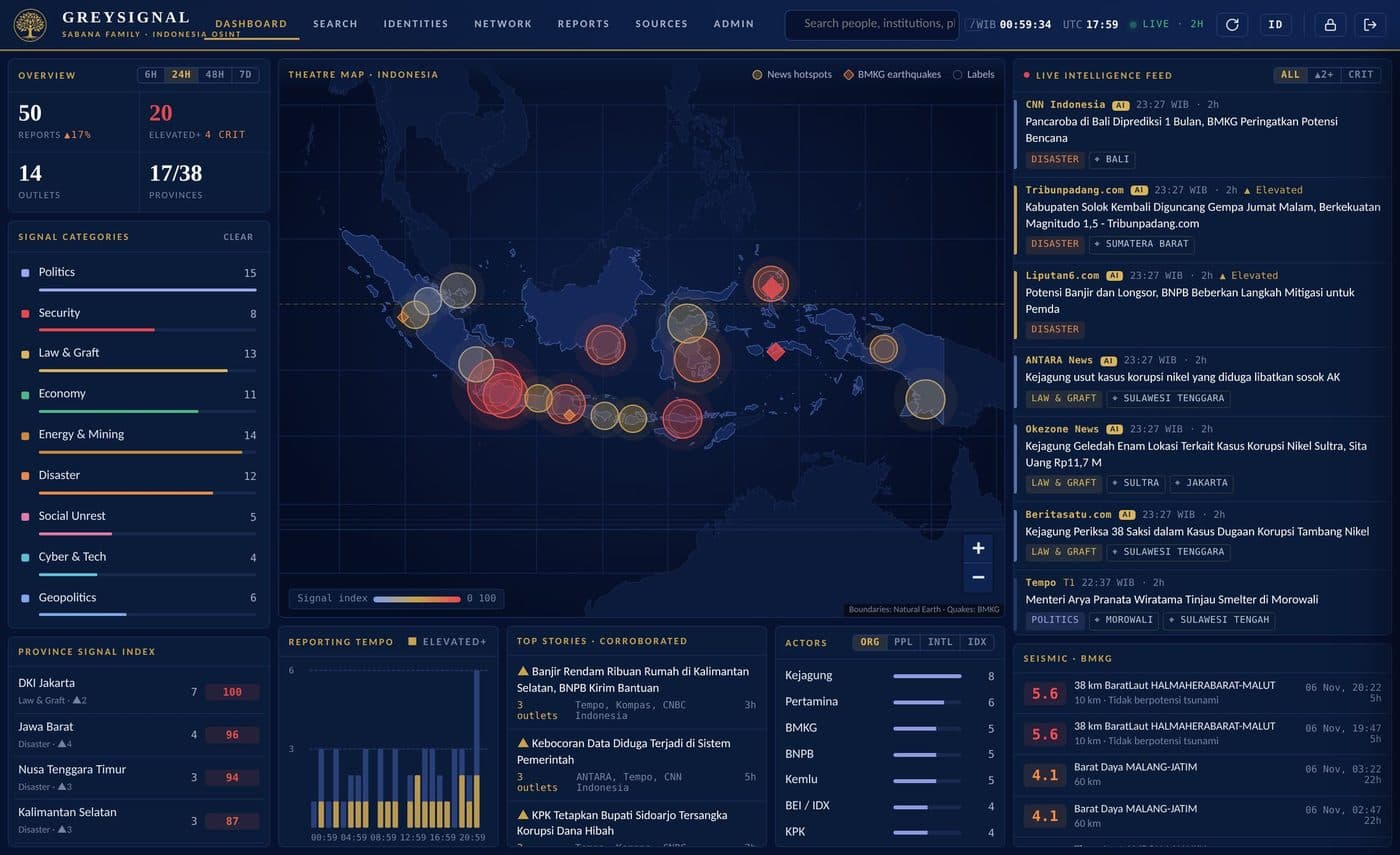
What is being reported, where, how serious it is, and whether it is accelerating. Choose a window of 6H · 24H · 48H · 7D and every panel follows it.

GREYSIGNAL dashboard: overview and categories, theatre map, live feed and BMKG seismic panel
GREYSIGNAL dashboard: overview and categories, theatre map, live feed and BMKG seismic panel. From a test installation; some items are sample data.

Theatre map

Each circle is a province: size shows the number of reports, colour shows a 0–100 signal index combining volume and severity. A pulsing ring flags high Elevated or Critical reporting. Click a province to filter the whole dashboard; diamonds mark BMKG earthquakes.

Feed, tempo and actors

The live feed shows the newest reports with outlet, tier, severity, places and tickers. Reporting tempo shows when a story broke; top stories are grouped across outlets so the best-corroborated rise; actors lists the most-mentioned institutions, people, foreign actors and tickers.

Severity levels

  • Routine · Normal reportingStatements, meetings, policy announcements
  • Notable · Worth notingInvestigations under way, mild market moves
  • Elevated · Needs attentionArrests and sting operations (OTT), floods, earthquakes, protests, data breaches, market shocks
  • Critical · Serious incidentDeaths, armed attacks, explosions, riots, tsunami warnings, states of emergency

Severity starts from keyword rules; when Claude AI is configured, each new article is also reviewed and adjusted.

PoliticsSecurityLaw & GraftEconomyEnergy & MiningDisasterSocial UnrestCyber & TechGeopolitics

Chapters 4–7

Article analysis, search, profiles and networks

Article detail & AI analysis

  • Open original ↗ always takes you to the publisher’s article — the authoritative source.
  • Every report shows severity, categories, places, institutions, people, foreign actors and tickers.
  • ✦ AI analysis (analysts) gives key facts, actors and roles, context, indicators to watch and confidence, with numbered citations.
  • Related coverage lists other reports on the same story.
Search

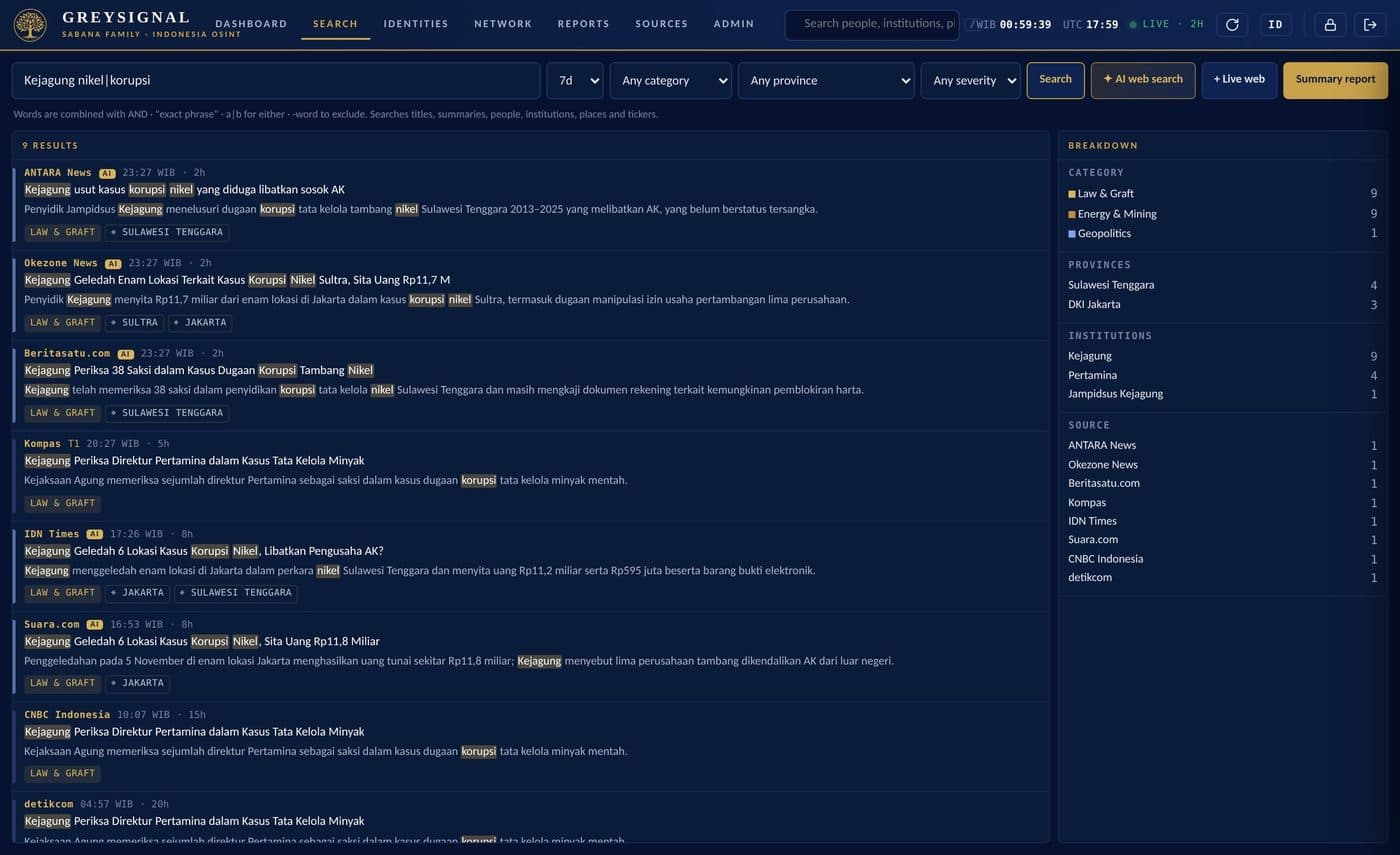
Search titles, summaries, outlets, people, institutions, places, foreign actors and tickers, then narrow by time window, category, province and minimum severity. When the collection has little on a topic, use + Live web or ✦ AI web search to bring in more from trusted outlets.

KPK korupsiReports containing both words (AND is the default)
"Laut Natuna Utara"The exact phrase
nikel|smelterEither word
KPK -sahamKPK, excluding reports that mention “saham”
Kejagung nikel|korupsi -PertaminaKejagung AND (nikel OR korupsi), excluding Pertamina
GREYSIGNAL search with highlighted matches and a breakdown panel
GREYSIGNAL search with highlighted matches and a breakdown panel. From a test installation; some items are sample data.

Identities: public figures

Profiles of officials, politicians and executives in the news, built from Wikidata and Wikipedia and linked to GREYSIGNAL’s own coverage: photo, positions held, biography, official channels and 30 days of news coverage with co-mentioned institutions and people.

Scope by design: profiles exist only for public figures with a Wikipedia article. Victims, witnesses and residents are never profiled, social networks are not scraped, and religion, ethnicity and family members are not collected.

Network analysis

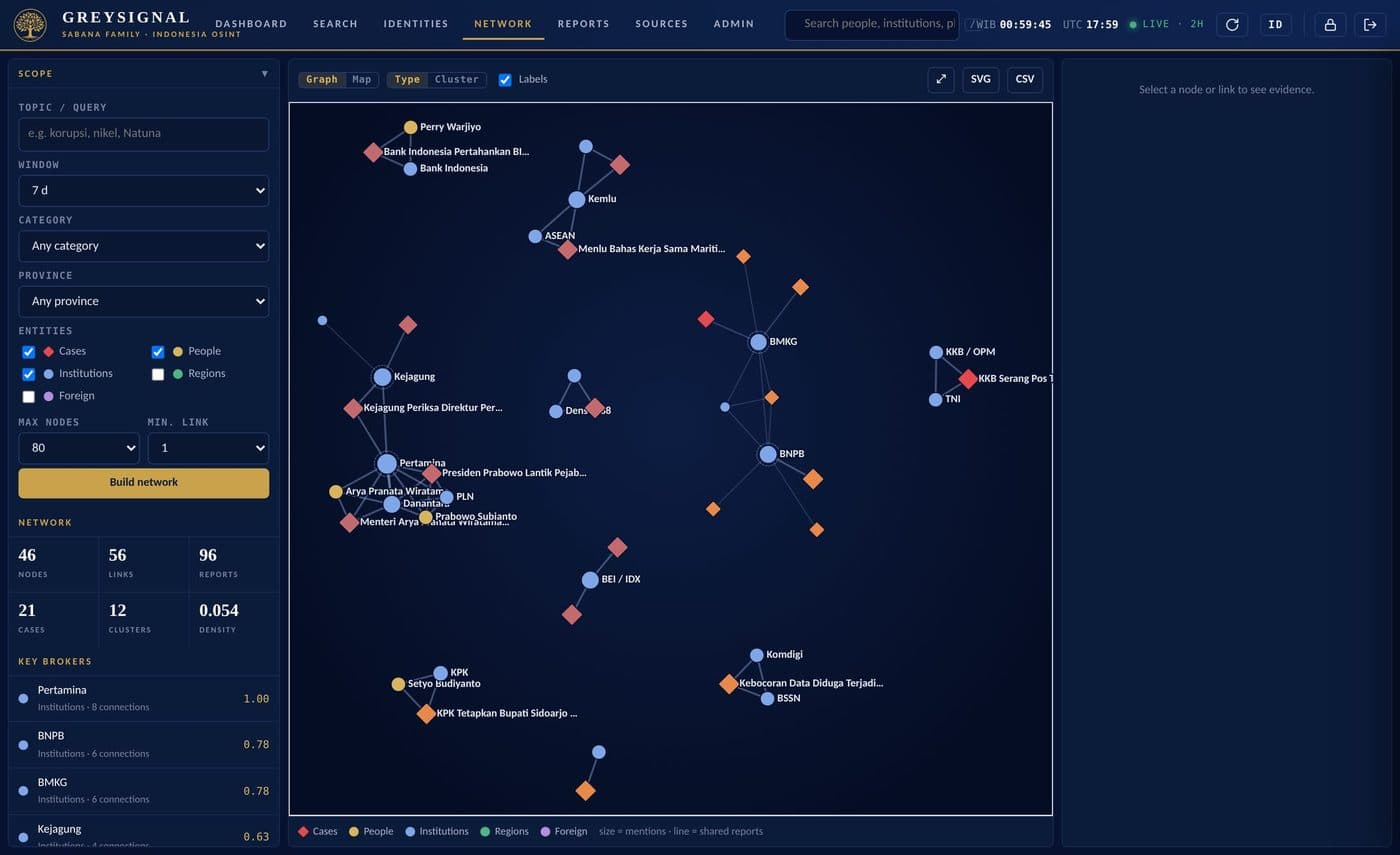
Shows how cases, people, institutions, regions and foreign actors are connected in the reporting, and who sits at the centre. Set a scope, choose the entity types, then build the network.

Node
— an entity; size shows the number of mentions
Link
— the same reports mention both; thicker means more
Broker score
— how often an entity bridges otherwise separate groups
Cluster
— a group more connected to itself — usually one case
Focus network
— one entity and its direct (or 2-hop) connections
Map mode
— places each entity at its province to show a case’s geography

A link means the media mentioned two entities together. It is not proof of a relationship — always open the Evidence list and read the context.

GREYSIGNAL network view with key brokers, clusters and the graph
GREYSIGNAL network view with key brokers, clusters and the graph. From a test installation; some items are sample data.

Export the graph as SVG, or as node and edge CSV files for Gephi, i2 Analyst’s Notebook or Excel.

Chapter 8 · Summary reports

A structured intelligence summary in seconds

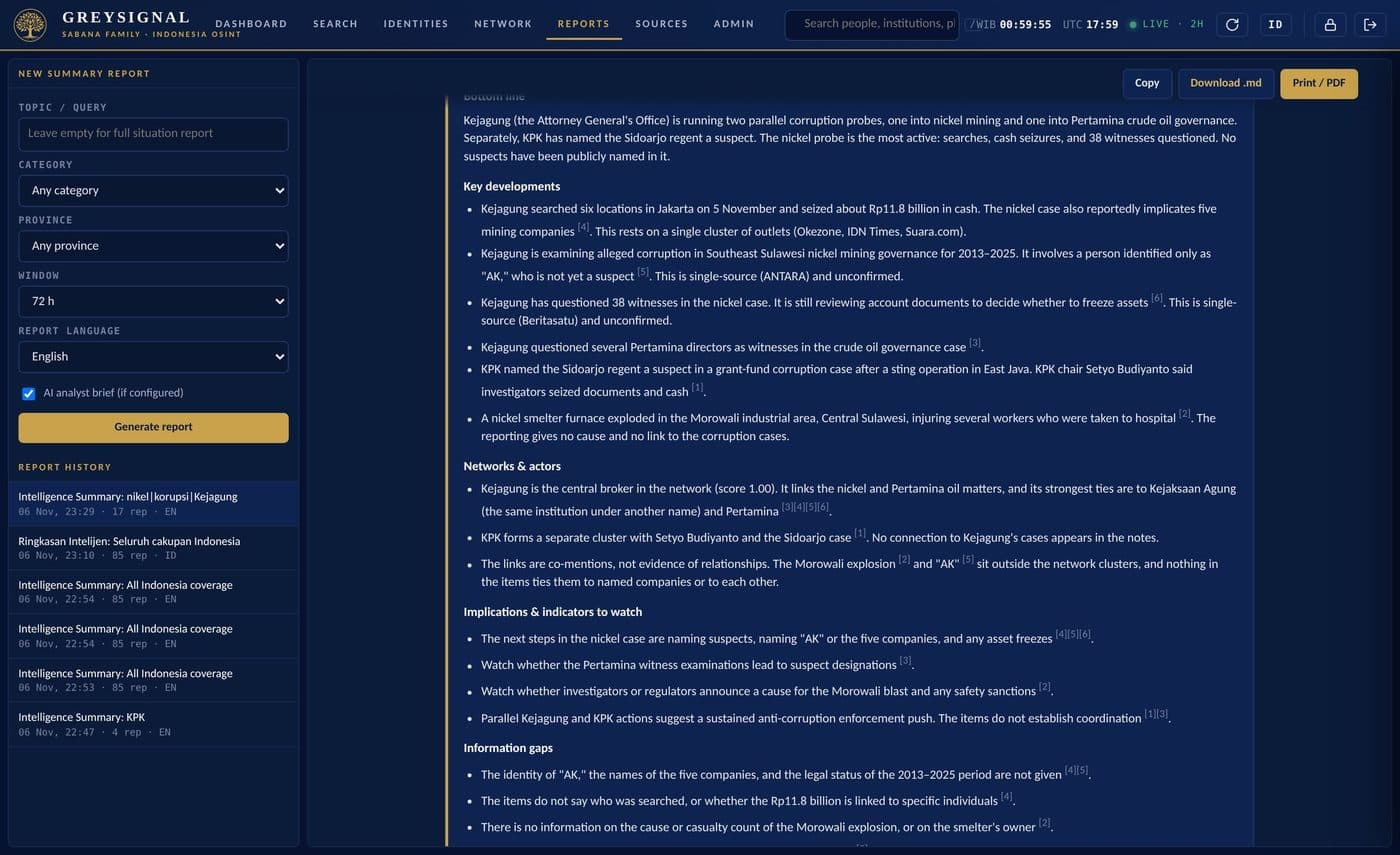
Open Reports — or press Summary report in Search, or Report on this on an article or profile. Set the topic, category, province, window and language (English or Bahasa Indonesia), keep the AI analyst brief ticked, and press Generate report.

Masthead & metrics
Scope, time of generation and counts of reports, stories, outlets, Elevated and Critical
Analyst brief (AI)
Bottom line, key developments with citations, networks and actors, implications and information gaps
Key judgements
Dominant categories, momentum, geographic concentration, severity and corroboration
Executive summary
The most representative sentences from the reporting, each linked to its outlet
Key developments
Up to 12 stories ranked by corroboration and severity
Network analysis
Key brokers, clusters and strongest links
Actors & geography
Institutions, people, foreign actors, tickers, provinces and the source base
Method
How the data was collected, and its limits
GREYSIGNAL summary report with the AI analyst brief
GREYSIGNAL summary report with the AI analyst brief. From a test installation; some items are sample data.

Share with Print / PDF in the Sabana Family letterhead style, Download .md for e-mail, Notion or wikis, or Copy. Report history keeps saved reports for everyone to reopen. Before circulating, check the key developments against the original articles — especially anything marked single-source or unconfirmed.

Chapter 11 · On a phone

Every feature works with touch

Tab bar

Dashboard · Search · Identities · Reports · More at the bottom of the screen.

Single column

The dashboard scrolls as one column; pinch to zoom the map and swipe the category chips.

Install as an app

Android: menu → Add to Home screen. iPhone: Share → Add to Home Screen. It then opens full-screen.

Chapter 12 · Security & responsible use

Protecting the organisation and the people in the reporting

Your responsibilities

  • Use a unique, strong password and never share your account — every action is logged under your name.
  • Sign out on shared devices.
  • Treat reports and exports as internal; share them only with authorised people.
  • Report suspicious sign-in activity to your administrator.

Responsible analysis

  • Automated tags, links and AI output are leads — verify them in the original articles.
  • A network link is a co-mention in the media, not evidence of wrongdoing or a relationship.
  • Public figures only: do not use GREYSIGNAL to profile private individuals.
  • Respect copyright: link to the original articles and do not republish them.

Access is enforced by role on every request, and security-relevant actions are kept in an audit log. The application had an independent security review before release.

Chapter 13 · Troubleshooting

Common questions

A menu or button is missing
Your role does not include it. Ask an admin.
Asked to set a new password
Normal on first sign-in or after a reset.
Signed out unexpectedly
Your session expired, or an admin changed your role or password. Sign in again.
Dashboard is empty
Collection starts shortly after the server starts. Check Sources.
No profile found for a person
Profiles exist only for public figures with a Wikipedia article. You can still search their name.
Wrong person linked to a name
Open the name from the news again and choose the correct person, or None of these.
The network is too crowded
Raise Min. link, lower Max nodes, narrow the topic or window, or use Focus network.
Severity or category looks wrong
Tags start from keyword rules, so mistakes happen. Judge from the article itself.

The PDF also includes the administration chapter and a one-page quick reference card.

Read online

The full document

GREYSIGNAL Monitoring v1.0

The PDF opens in your phone’s viewer.

Read the PDF

Ready to start?

Sign in at greysignal.eaglenest.id.

GREYSIGNAL works from public reporting and official open data. Automated tags and AI output are leads, not conclusions, and a network link is a media co-mention, not proof of a relationship. Screenshots come from a test installation; some show fictional sample data.